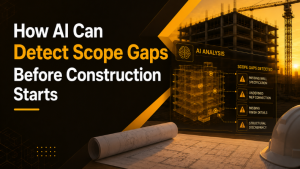

Construction problems rarely announce themselves. They show up as misplaced sleeves, ducts that won’t fit above the ceiling, or wall assemblies that weren’t checked against the BIM model before installation.
At Groundbreak 2026 in Orlando, October 21–22, check out iFieldSmart AI at Booth #1216 to learn how AI-driven construction workflows, verified by construction experts, can help you spot problems early. Explore document intelligence, BIM vs. field comparisons, and mixed reality, and learn how smarter project data connections can help you avoid problems.
Connect Construction Data Across Project Workflows
A single project comprises drawings, specification books, which can be several hundred pages, Building Information Modeling (BIM) files, Requests for Information (RFI) and Submittal logs, clash detection reports, and thousands of other files. These files can be stored and utilized with different software applications such as Autodesk Construction Cloud, SharePoint, Box, and Google Drive. In the meantime, the building site produces its own documentation using 360° cameras, drones, and lasers. The information is true for the most part. It’s divided. The field displays one thing, the design says another, and the two are only linked until the gap has resulted in an RFI, rework, or change order.
Work Smarter, Not Harder
iFieldSmart empowers your team with AI-driven efficiency to simplify scheduling, boost collaboration, and keep projects on track.
Schedule a MeetingAll of it is combined into a single intelligence layer by iFieldSmart AI, and teams are not required to abandon their current tools. AI first reviews the content. An AI system suggests potential issues in a construction expert’s area of expertise, and the construction expert indicates the likelihood of the issues occurring. The expert then identifies a best solution using the information provided by the AI system and verified by the SME.
Turn AI Findings into Actionable Construction Decisions
A useful finding tells where the issue is, why it matters, and what to do next. “Sleeve missing” is a status. “These sleeves, at this grid location, need to move to the modeled position before the pour” is something a superintendent can assign and close.
That’s the standard to hold the examples below against. A construction AI tool should be judged on whether its output can be assigned and closed, not on how much it can summarize. Counts and charts have a place, but they’re the start of a decision, not the decision.
Transform Document Reviews and Scope Management with AI
The skills side of the platform puts AI and expert verification on the digital record. The documented skills are scope of work, scope gap, project Q&A, submittal log, compliance review, constructability review, email, meetings, change management, and custom skills. Visitors of Groundbreak can see how teams use these workflows to check drawings and specifications against scope, review submittals, and manage project information.
Resolve Constructability Issues Before Construction
A constructability report shows what the output looks like. On Level 01 of a clubhouse, a 36-inch by 24-inch concrete beam sits in the duct zone. The outside-air duct, roughly 25 by 11 inches once insulated, can’t fit in the plenum and would end up exposed below the ceiling. The report marks where this sits on the drawing, explains how it would become a field problem, and recommends resolving the duct routing, a design change, before BIM coordination and construction begin.
The same report also flagged missing condensing piping and VRF branch-selector locations, and missing supply-air duct sizes. None of these is exotic. Each is the kind of gap that normally surfaces during coordination or installation, when the fix costs more than a revised sheet.
Every output from the skills goes through both steps: AI first, then an expert. A scope-gap or submittal review gets the same human check before your team relies on it.
Connect Field Data with BIM Through Lens360
Lens360 does for field data what the skills do for documents. It turns 360° captures, drone imagery, and laser scans into reports on thermal conditions, field versus BIM deviations, sleeve installation, and progress. At the booth, it’s where you can see how reality capture connects with BIM to show what’s actually happening on the jobsite.
Verify Sleeve Installation Against BIM
In a sample sleeve report for Level 03, there were 69 sleeves in total. From that number, 62 installations were successful (89.9%); 5 of them were not situated in their optimal places, whereas 2 of the installations were not implemented at all. Although percentages are what top the summary, they usually hide the gist of this material. More specifically, 3 sleeves were found at slightly different locations than those presented in the as-built point cloud, and another sleeve was part of the model but missing on site. The next step was specific: relocate to the modeled position before the pour, and verify the missing sleeves on site.
Improve Field Verification, Thermal Inspection, and Progress Tracking
The deviation reports look into the 360° field capture and the BIM to find out whether the work has been installed according to the design. One of the instances found in the engaging observation logs was related to the elbow that has been installed at 90°, whereas according to the model, it should have been a 45° elbow. In other examples, one can find that there was supposed to be a transition in a duct run at some locations, the sanitary riser was installed in front of the wall instead of behind, and there was a rectangular duct with no connection for a round branch. In addition, the report can suggest alternative solutions when there is an issue with the BIM itself is discovered on site.
The procedure for thermal tasks is invariant. For example, during an outdoor inspection of a sample unit, a thermal anomaly was observed in combination with a patch or an interrupted WRB. Recommended steps: remove the patch and verify the substrate and insulation, reseal the membrane with an appropriate lap, and re-scan. The same report called for completing the flashing above another unit before concealment and addressing exposed electrical conductors immediately.
Progress tracking works at the schedule level. Each level and discipline (HVAC, electrical, plumbing, fire protection, as well as walls and ceilings) is tracked in accordance with due dates. Any delays reported on a level would raise a red flag, and milestones achieved over the course of the week and activities for the upcoming week will be mentioned.
Track BIM Coordination with Real-World Site Conditions
The link between the jobsite and the digital record is VDC + Mixed Reality. It connects field execution and BIM coordination. Teams may integrate coordination workflows with RFIs and Procore and handle conflicts using the Navisworks plugin. Teams may see design intent alongside real site circumstances by using mixed reality on Oculus VR/AR and mobile devices, which places the BIM model in the context of the actual jobsite. Visitors can learn how to manage conflicts, enhance BIM coordination, and link digital models with actual site circumstances at Groundbreak.
It’s important to arrive with specifics because this is where your workflow determines what matters. Find out what the RFI sync covers and how the plugin works with your current coordination meetings. Then think about which jobsite conditions you’d most want to see against the model.
Choose the Right AI Workflow for Your Construction Needs
Each area is a different way into the same idea, so start wherever the problem hurts most.
| If your biggest problem is | Start with | Worth asking about |
|---|---|---|
| Documents: scope, specifications, submittals, email and change management | iFieldSmart AI skills | Scope gap, constructability review, submittal log, compliance review |
| The gap between what was designed and what was built | Lens360 | Sleeve verification, field vs. BIM deviation, thermal inspection, progress tracking |
| Coordination and visualization | VDC + Mixed Reality | Navisworks plugin for clash management, RFIs and Procore sync, the mixed reality view of BIM on the jobsite |
Understand AI Review Capabilities and Limitations
iFieldSmart AI reviews rely on the project information teams provide. They identify potential risks from available data but do not simulate construction or guarantee that every issue will be detected. Results vary by project, and no fixed savings figure can be promised.
The examples in this article come from sample reports. They illustrate how findings and recommended actions are presented, not guaranteed outcomes for every project. Construction SME verification adds practical judgment, helping teams assess which findings warrant action.
Catch Construction Issues Early with AI-Powered Insights
Before heading to Orlando, consider the most recent construction problem your team found too late and the resulting rework, delays or coordination effort.
Bring your challenge to iFieldSmart AI on October 21–22 at Groundbreak 2026 at Booth #1216. Talk about how document intelligence, VDC + Mixed Reality, or Lens360 site documentation could help your team find comparable problems sooner.
The issue that the team wishes to resolve, whether it’s a field condition that didn’t match the model, a coordination issue, or a gap in the documentation.
The most valuable discovery is when the solution is still a drawing change.