


Reading Time: 9 minutes
Let’s talk about handover. Not the glossy binder kind. The real handover that helps people do work on day one. Owners want to turn the lights on and feel ready. Facility teams want to know what lives where. And why it matters. Paper files rarely help with that. They sit. They age. They hide the story you need right now.
A better way is on the table. Platforms like Lens360 make this shift possible in a practical, day-one-ready way. It uses simple 360 visuals tied to a place. It links files to rooms and systems. It shows what was built and where it sits. It lets teams click a room and get the facts. That change sounds small. It is not small at all. It saves time and stress when the clock is loud. It gives owners a tool that fits the job. It gives facility teams the view they always wanted. A view that matches the building itself.
Why old handovers fall short
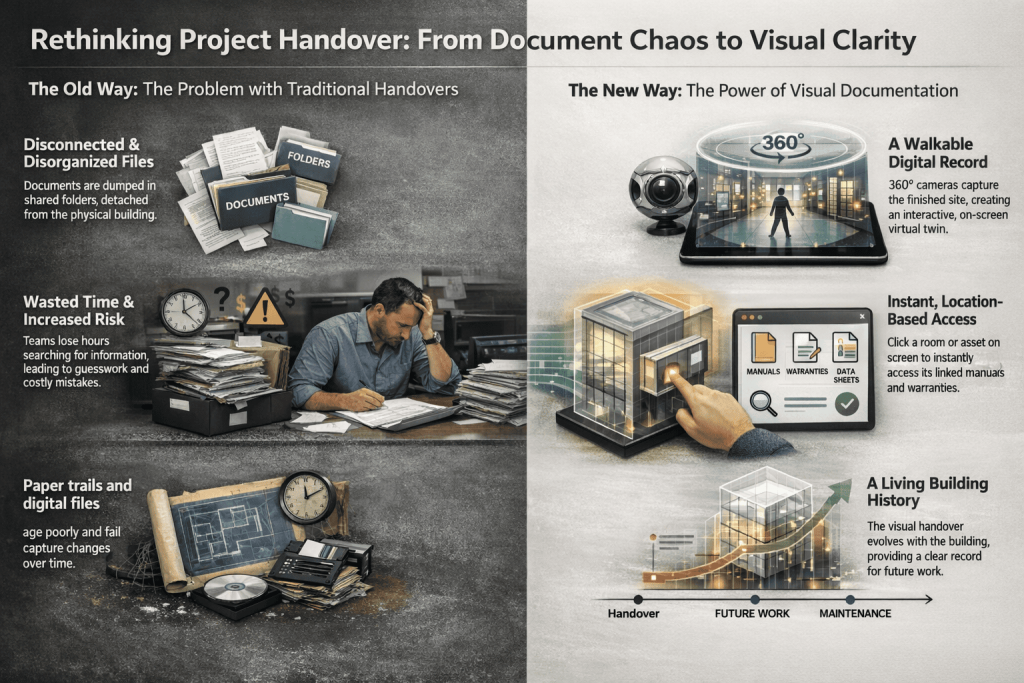
Most closeouts drop folders on a shared drive. The files pile up and drift apart. You look and look and then guess. Where is the valve? Which panel feeds this room? Which pump is still in warranty? You lose time as emails bounce around. You risk mistakes as pressure builds. That is not a handover. That is homework with no answer key.
Work Smarter, Not Harder
iFieldSmart empowers your team with AI-driven efficiency to simplify scheduling, boost collaboration, and keep projects on track.
Schedule a MeetingA handover should tell a clear story. It should match the building you can touch. It should show the system you stand next to. The fix starts with clear visual proof. And links that live in the right spot.
The core idea in plain words
Walk the finished site with a 360 camera. Capture every hall and room in high detail. Pull in the closeout files you already have. Think manuals and tests and warranties, and as built plans. Map those files to the exact room or asset.
Now your handover is not a pile of files. It is a building you can walk on screen. You click the room and the right file opens. You click the air handler, and its records appear. No hunt. No guess. No messy detours.
How the flow works end-to-end
First comes the 360 capture of the finished site. Every level gets a clear, walkable pass. The imagery is crisp and easy to scan.
Next, the closeout files are pulled together. A team checks and organizes what matters most.
Then smart mapping links each file to a place. Modern AI helps match each document to the right room or system, cutting errors and making the mapping far more accurate than manual methods.
A room is not just a name now. It is a live point that opens the right record.
Last comes simple access on day one. Owners and facility teams log in and find what they need. They can share a link in one click. They can teach new staff with a guided walk. They can spot what is behind a wall without opening it.
What changes for owners
You get a package that makes sense fast. It is not a folder maze. It is a visual handover tied to space. You can confirm what was built in minutes. You can pull a manual during a service call. You can answer a warranty claim with proof. You can start a maintenance plan right away. You can store knowledge that stays when people leave. That is the value you can feel in the first week.
What changes for facility teams
Onboarding gets lighter and moves quicker. New techs can train from a laptop. They can walk the site on screen before a shift. They click a room and see the right files. They trace a system without guesswork.
They plan tasks by location, not by legend. They fix issues with fewer back and forths. They document work and add notes as they go. The handover keeps growing with the building. It becomes a living as built for daily use.
Better proof. Better trust.
Visuals lower the friction between teams. They show status without long debate. An image stitch does not argue or forget. It backs up the record with sight and space.
When a claim comes up, proof is there. When a dispute starts to rise, context helps. Plain pictures settle lots of small fights. That saves time and avoids strain with partners. It also helps with audits and rules. Clean records calm hard days.
Ties into the tools you already use
A good handover does not live alone. It plugs into current systems you trust. It links to model data and to project hubs. That includes smooth connections with platforms like Procore, Autodesk Build, and BIM tools your teams already depend on.
It pushes or pulls files without drama. That way, you are not copying work twice. You keep one source and reach it from many doors. Owners and crews like that kind of flow. It fits how teams already get work done. It keeps the data close to the job site life.
Day one use cases that matter
Train the facility team before the keys move. Show the site with a guided walk. Link each stop to its records and notes. Handle a warranty call with quick pulls. Open the right test report as you talk.
Confirm the final install in a tricky room. See what sits above a ceiling without a ladder. Start a preventive task plan with location tags. Add new documents over time as work continues. Keep that knowledge in reach for years and years.
Time saved shows up fast
Think about the usual hunt across folders. Ten minutes here. Twenty there. A call. An email chain. Then another look.
Visual handover cuts that noise down. Click the room and get the right thing. Show the screen on a quick call. Move on to the next task right away.
Those small wins stack up over a month. Over a year, they pay for themselves. People feel it in their day. The pace eases and work flows again.
Why does this help beyond turnover?
Handovers are not just one day at the end. Work keeps going after the ribbon gets cut. A school adds a lab. A clinic changes its floor plan. A store flips a display and adds power. The building shifts like a living thing.
A visual handover keeps up with that. Add new records as the space changes. Keep a clear trail for the next crew. Keep the map honest and useful. That habit builds real long-term value.
A simple example to picture
Say a chiller trips on a hot Monday. The team needs facts fast. They open the visual map on a tablet. Click the plant room. Up comes the chiller record.
Manuals and tests are right there. They check the last report and notes. They see photos from the last visit. They locate the valve path in the same view.
That is not magic. It is just a good handover. But it feels like a deep breath when things go wrong.
What about standards and structure
Good handovers still need structure. That part does not go away. The difference is in how people reach the files. Location first. Then the right document type. Then the specific version.
The system nudges teams to keep it tight. It links to model views when helpful. It adds field context that a plan lacks. It reduces the mismatch between drawings and real life. It lowers the gap between the desk and the floor. That gap hurts teams more than they say.
A note on trust and adoption
People use tools that feel simple and fair. This approach feels that way. Click a room. Get the facts. Share a link. Done.
No steep steps or long codes. No hunting through dead folders. The map itself invites people in. It feels close to how the world looks. That small design choice matters more than buzz. It drives use on normal weeks and hard days.
Getting started without fuss
You do not need a huge plan to start. Begin with a final walk of key areas. Pull in core files for those rooms. Map what helps the most right now.
Train the team in a single short session. Then add more rooms and files next week. Keep moving in small steps that stick.
The value shows up before the project ends. The last month feels calmer and more sure. Everyone stops losing time to the same search.
The bigger picture for owners
Owners care about risk and cost, and time. A clear handover hits all three at once. It lowers risk with proof tied to place. It lowers cost by shaving hours from the hunt. It saves time in every follow-up task.
It makes handover a start line and not a stop. That is the shift that matters most here. You can feel it in daily work. You can measure it in months and quarters.
The bigger picture for facility teams
Facility teams carry the building every day. They field calls and fix problems. They train new techs and deal with vendors.
The best gift is a map that tells the truth. It keeps records of where work happens. It puts context around every task. It saves legs and minds on long shifts. It makes hard weeks a little less hard. That is worth more than any slide deck.
Final thought
Handover should not feel like a cliff. It should feel like a bridge to the next phase. A visual handover with 360 data builds that bridge.
It meets owners and facility teams where they live. On the floor. In the room. Next to the system they must service.
It ties the right file to the right place. It gives calm in the rush. It helps people do the job right now. That is the kind of win that lasts.